Record your rehearsal with live lighting cue data.
CueCam connects to your ETC Eos console and overlays cue numbers, scene labels, and markers directly onto your video recording. Review every lighting moment with clarity.
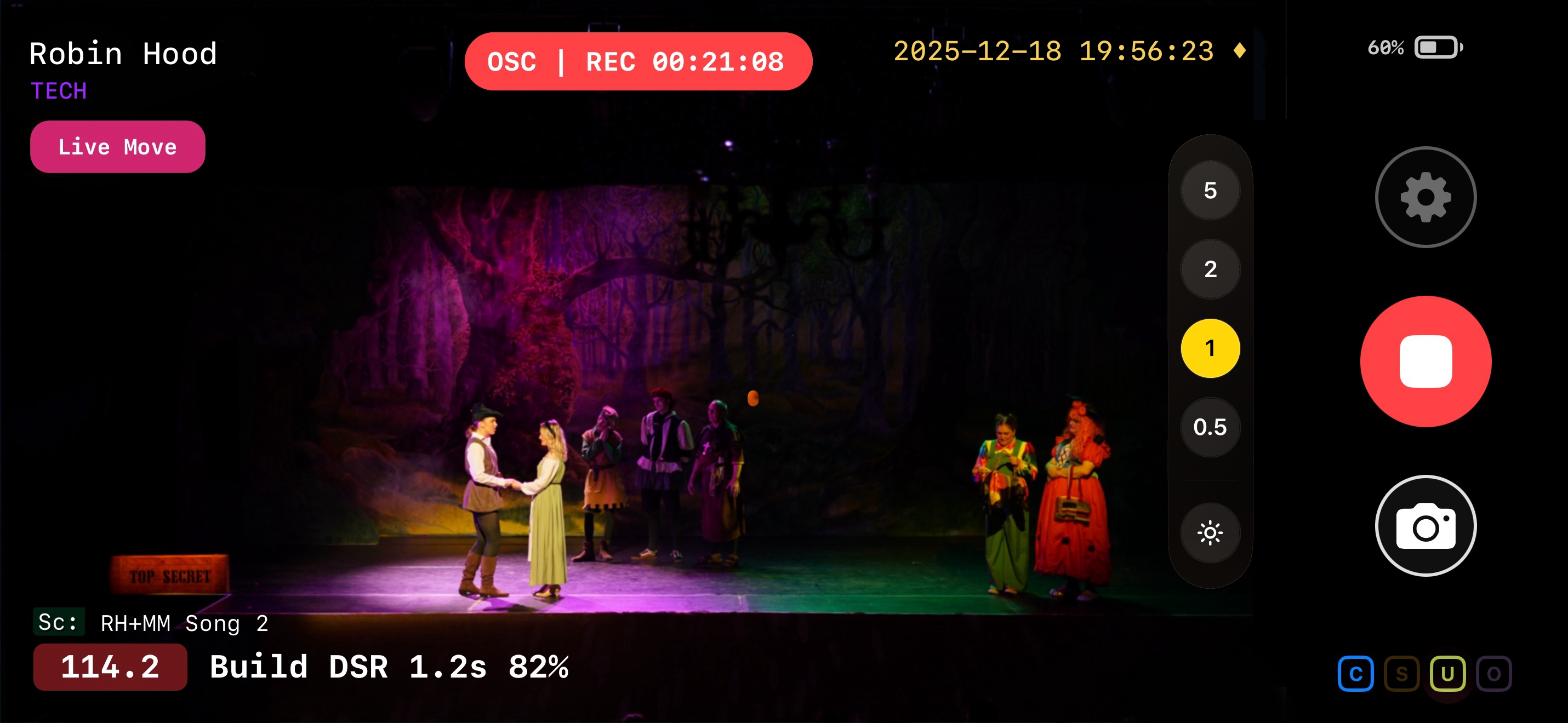
Everything you need at your fingertips.
CueCam is purpose-built for lighting designers and programmers working with ETC Eos, and other members of the production team. Every feature is designed for the realities of tech week and beyond.
Colour-Coded Markers
Drop markers during recording to flag blocking notes, timing issues, director's notes, or anything else. Find them instantly during playback using chapter markers or CueCam Play.
Automatic CueSnaps
A still photo can be captured automatically every time a cue fires. Build a complete visual record of every lighting state without lifting a finger. Make relights easy.
RTSP Video Streams
Embed a live camera feed and CueCam's recording status directly into your Magic Sheets. Have confidence in your recording state and markers at a glance — without ever leaving your desk.
Full OSC Control
Start and stop recording, fire markers, snap cue photos, and manage timers — all remotely via OSC commands from your console or any OSC controller (QLab, Companion etc.).
Clean Archive Copy
Record a simultaneous clean version with no overlays — perfect for archival purposes or sharing with other members of the team who just need to see the show.
Direct to Dropbox
Upload finished recordings and CueSnaps straight to Dropbox from the app. Share with your whole production team before you've even put the workers on.
Apple Watch Remote
Control recording, and add markers and cue points from your wrist. Perfect for when you're sitting in the house or someone else is at the desk.
Set up in minutes, not hours.
CueCam connects to your Eos console over your existing network. No extra hardware, no complex configuration.
Connect to Eos
Automatically discover your Eos family console (or ETCnomad) on the network or simply enter its IP. CueCam receives live cue data over OSC on your production WiFi network.
Point and record
Set up your iPhone or iPad with a view of the stage. Hit record — or start remotely from your console or Apple Watch.
Review and share
Browse recordings by scene and cue with standard chapter markers or CueCam Play. Upload to Dropbox automatically to share with the rest of the production team.
From first rehearsal to final performance.
Tag every recording with its production stage or what matters to you.
Build a searchable archive that tells the story of your show from the earliest blocking to closing night.
Add markers exactly when notes happen.
Drop markers in the moment to flag cues, timing notes, performer moments, or technical fixes. You can easily jump straight to each marker when reviewing your recordings, or generate reports in CueCam Play.
Markers can be added by OSC from Direct Select Macros, Magic Sheets, Companion, QLab or anything that sends OSC. Or even from your wrist with Apple Watch.
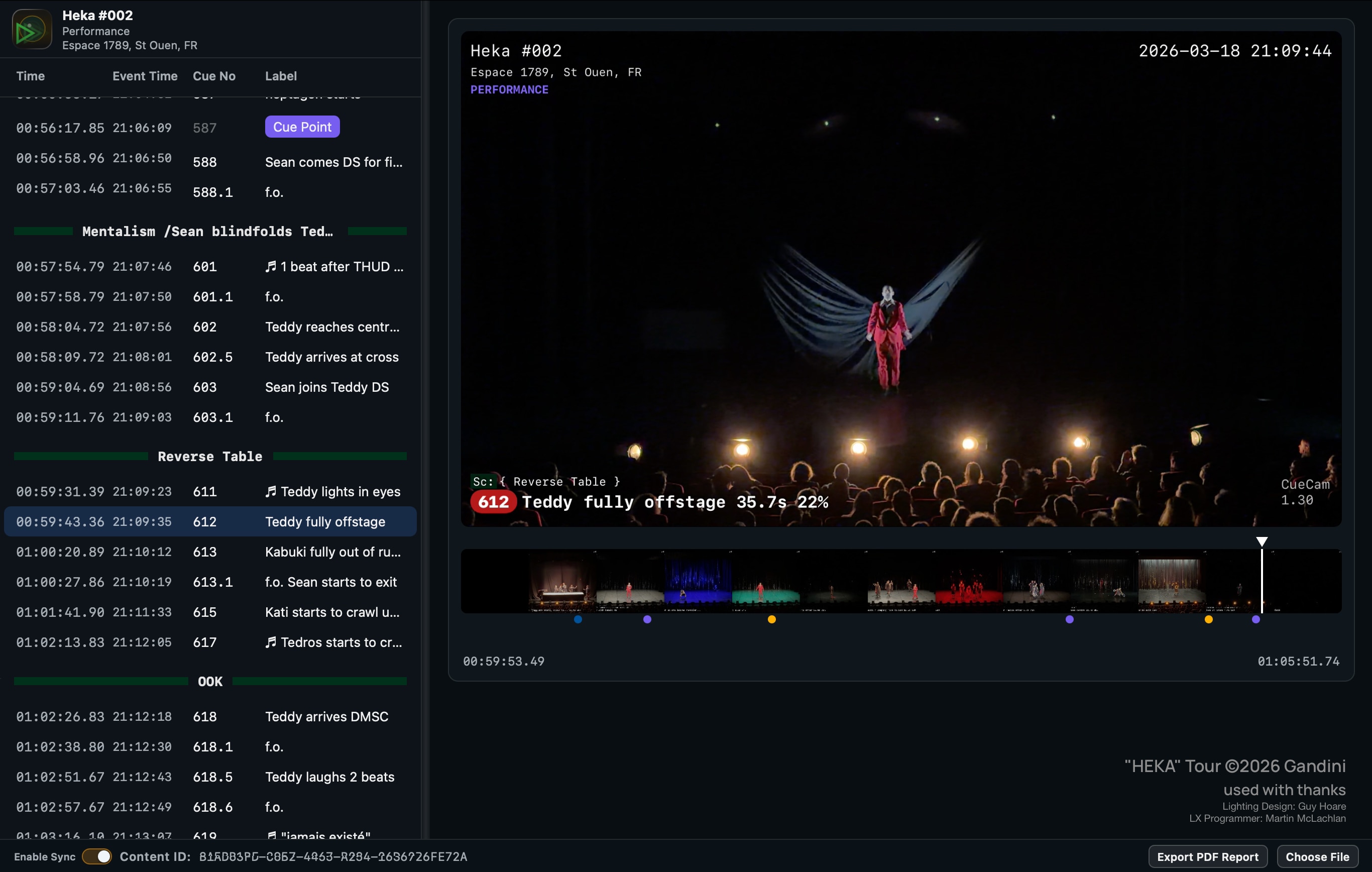
Review faster with CueCam Play.
CueCam Play is a free web-based review tool built for quickly navigating your recordings, jumping to key moments, and collaborating with your team during notes sessions.
No download or installation necessary. CueCam Play runs in a web browser, anyone can use it. You can synchronise your CueCam Play session with others so you're always on the same page.
- Navigate by Scene and Cue.
- Jump between CueCam Markers.
- Collaborate in real-time with others.
- Generate PDF reports of cues with Markers for easy review.
- Your show is private, your content doesn't leave your computer.
Frequently asked questions
How does CueCam connect to my Eos console?
CueCam connects over your local network using the OSC (Open Sound Control) protocol. Enter your console's IP address in CueCam's settings and it will receive live cue data in real time. It works with any ETC Eos-family console running version 3.2 or later — from Apex, Eos, Ion, Gio, to Element and Nomad.
What devices does CueCam support?
CueCam runs on iPhone and iPad (iOS 18.6 or later), and Apple Watch (watchOS 11.0 or later). Use your phone or iPad as the camera, and your Apple Watch as a wireless remote control.
Can I use CueCam on my Mac?
At present, no. But we're working on a macOS version!
Is CueCam free?
CueCam is free to download and try the functionality unrestricted for five minutes. The full licence is a one-time purchase of £34.99 (or approximate equivalent in your local currency) — no subscription, no recurring fees. You buy it once and it's yours.
Can I share recordings with my production team?
Absolutely. CueCam exports standard video files that play on any device — no special software needed. Upload directly to Dropbox from the app, or share via email, or any method you prefer. Chapter markers let your team jump straight to specific cues and the CueCam Play application makes it even easier to navigate your show.
I can stream video to my console?
Yes! CueCam includes a built-in RTSP server which is supported in recent versions of Eos.
You can embed a live camera feed and recording status directly into your Eos Magic Sheets, so you can have confidence in monitoring your recording state, markers, and other data without leaving your desk even when your iOS device is positioned out of reach.
Does CueCam collect my data?
No. CueCam does not collect any personal data. An optional venue location feature sends anonymous, ephemeral GPS data to identify nearby venues for metadata — nothing is stored or linked to you.
What about MA, Avolites, Chamsys..?
CueCam was designed by theatre lighting designers and programmers initially for our own use, and we predominantly use ETC Eos.
We may consider support for other desks in the future, but right now we're making the best tool we can to work with the tools we already use.
Where can I find more information?
You can find comprehensive documentation here.
Ready to bring clarity to your production desk?
Download CueCam and connect to your Eos console in
minutes.
Free to try, no
subscription required.